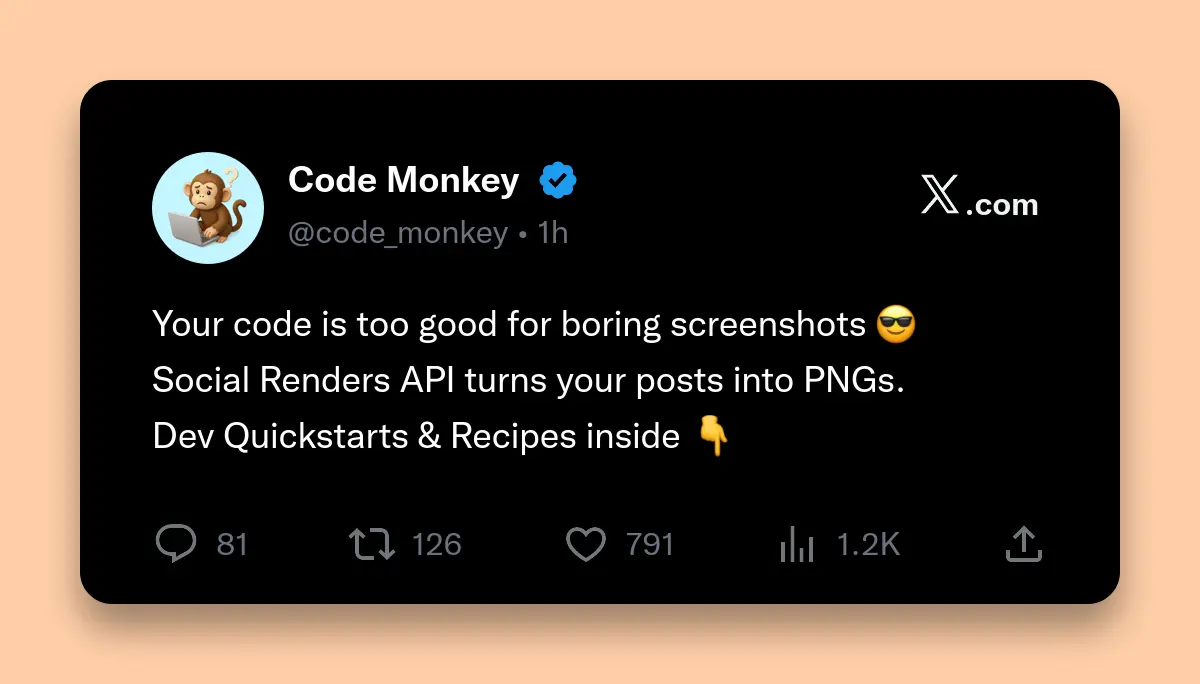
Why Do Developers Love the Social Renders API?
Social Renders API turns social media posts into images programmatically. Send JSON, receive PNG. No Puppeteer, no Chrome instances, no infrastructure. Works with Node.js, Pipedream, n8n, and Airtable.
Manual screenshotting doesn't scale. Browser extensions break. Social Renders provides a simple REST API for generating Twitter, Reddit, LinkedIn, and Threads screenshots.
This developer quickstart includes authentication, endpoints, templates, Node.js code, and automation recipes. Copy-paste snippets that work immediately.
What You'll Learn
- How the Social Renders API works (authentication, endpoints, templates)
- Node.js quickstart with full working code
- Real-world automation recipes for newsletters, social proof and batch generation
- Best practices for caching, error handling and production deployments
- Troubleshooting common issues
Who This Guide Is For
- Backend developers building content pipelines
- Frontend engineers implementing dynamic OG images
- Indie hackers automating social media workflows
- Technical marketers using no-code tools like Pipedream and n8n
- Newsletter creators who need consistent social media visuals
How Does the Social Renders API Work?
POST JSON data to api.socialrenders.com/generate with Bearer token. API returns PNG buffer or hosted URL. Choose template (twitter-post, reddit-post, etc.) and customize fields.
Authentication
Every request requires an API key passed as a Bearer token:
Authorization: Bearer sk_live_your_api_key_hereYou can generate API keys from your Social Renders dashboard. Just keep these secret, you don't want them exposed in client side code.
The Core Endpoint
POST https://api.socialrenders.com/generate
Content-Type: application/json
You send a JSON payload describing the social media post you want to render. The API returns a PNG image (binary data) that you can save, serve or pipe to another service.
Available Templates
| Template ID | Platform | Use Case |
|---|---|---|
twitter-post |
Twitter/X | Tweet screenshots, testimonials, social proof |
reddit-post |
Reddit post screenshots for newsletters, blogs | |
linkedin-post |
Professional testimonials, B2B social proof | |
threads-post |
Threads | Meta Threads post screenshots |
Request Structure
Every request follows this pattern:
{
  "templateId": "twitter-post",
  "fields": {
    "displayName": "Jane Developer",
    "username": "janedev",
    "tweetText": "Just shipped my first feature using the Social Renders API!",
    "timestamp": "2h",
    "likeCount": "847",
    "repostCount": "52",
    "replyCount": "31",
    "viewCount": "12.5K",
    "isVerified": true,
    "enableBackgroundColor": true,
    "backgroundColor": "#1a1a1a",
    "boxShadowAmount": 1
  }
}
All fields are optional, the API will use sensible defaults. But providing your own data makes your screenshots look way more authentic.
Response
The API returns a PNG image as binary data. The default width is 1200px with dynamic height based on content length (typically 400–1200px depending on the post).
Quickstart: Generate Your First Screenshot with Node.js
Let's generate a tweet screenshot using vanilla Node.js. This example uses the built-in
fetch API (Node 18+) and writes the result to a file.
const fs = require('fs');

async function generateTweetScreenshot() {
  const apiKey = process.env.SOCIAL_RENDERS_API_KEY; // Always use env vars!

  const payload = {
    templateId: 'twitter-post',
    fields: {
      displayName: 'Sarah Chen',
      username: 'sarahcodes',
      tweetText: 'Just discovered @SocialRenders - finally an API that turns my tweets into images without spinning up Puppeteer. This is going to save me so much time on my newsletter automation.',
      timestamp: '4h',
      likeCount: '1,247',
      repostCount: '89',
      replyCount: '42',
      viewCount: '15.2K',
      isVerified: false,
      // Optional: Add a profile picture (base64 data URL only)
      // profilePicture: 'data:image/png;base64,...'
    }
  };

  const response = await fetch('https://api.socialrenders.com/generate', {
    method: 'POST',
    headers: {
      'Authorization': `Bearer ${apiKey}`,
      'Content-Type': 'application/json'
    },
    body: JSON.stringify(payload)
  });

  if (!response.ok) {
    const error = await response.json();
    throw new Error(`API Error: ${error.message}`);
  }

  // Response is binary PNG data
  const imageBuffer = Buffer.from(await response.arrayBuffer());
  fs.writeFileSync('tweet-screenshot.png', imageBuffer);

  console.log('✅ Screenshot saved to tweet-screenshot.png');
}

generateTweetScreenshot();
What's Happening Here
- API Key from environment: Never hardcode secrets, use
process.envor a secrets manager instead. - Realistic field data: The more authentic your data looks, the better your screenshots appear.
- Error handling: Always check
response.okbefore processing, the API returns helpful error messages. - Binary response: The API returns raw PNG bytes, not base64 or a URL. Convert to a Buffer for file operations.
Run it:
SOCIAL_RENDERS_API_KEY=sk_live_xxx node generate-tweet.jsReal-World API Recipes
Recipe: Turn Any Tweet Into an OG Image
Content teams love this pattern: take a real tweet and turn it into a branded image for newsletters or blog headers.
async function tweetToOgImage(tweetData) {
  const response = await fetch('https://api.socialrenders.com/generate', {
    method: 'POST',
    headers: {
      'Authorization': `Bearer ${process.env.SOCIAL_RENDERS_API_KEY}`,
      'Content-Type': 'application/json'
    },
    body: JSON.stringify({
      templateId: 'twitter-post',
      fields: {
        displayName: tweetData.author_name,
        username: tweetData.author_username,
        tweetText: tweetData.text,
        timestamp: formatTimestamp(tweetData.created_at),
        likeCount: formatNumber(tweetData.public_metrics.like_count),
        repostCount: formatNumber(tweetData.public_metrics.retweet_count),
        replyCount: formatNumber(tweetData.public_metrics.reply_count),
        viewCount: formatNumber(tweetData.public_metrics.impression_count),
        isVerified: tweetData.author_verified,
        avatarInitials: tweetData.author_name.split(' ').map(n => n[0]).join(''),
        // Add subtle branding
        enableBackgroundColor: true,
        backgroundColor: '#0f172a',
        boxShadowAmount: 2
      }
    })
  });

  return Buffer.from(await response.arrayBuffer());
}

// Helper functions
function formatTimestamp(date) {
  const hours = Math.floor((Date.now() - new Date(date)) / 3600000);
  return hours < 24 ? `${hours}h` : new Date(date).toLocaleDateString();
}

function formatNumber(num) {
  return num >= 1000 ? `${(num / 1000).toFixed(1)}K` : num.toString();
}
Recipe: Reddit Post → Newsletter Image
Newsletter writers often want to showcase Reddit discussions. Here's how to generate a Reddit post screenshot:
const redditPayload = {
  templateId: 'reddit-post',
  fields: {
    displayName: 'curious_dev',
    username: 'curious_dev_42',
    title: 'What APIs have genuinely saved you hours of work?',
    content: 'I just found Social Renders and it replaced my entire Puppeteer screenshot pipeline. What are some other APIs that have been game-changers for your workflow?',
    upvotes: '2.4K',
    comments: '847',
    isVerified: false,
    enableBackgroundColor: true,
    backgroundColor: '#1a1a1a',
    boxShadowAmount: 2
  }
};
Recipe: Airtable Automation Script
Airtable's scripting extension lets you call external APIs. Here's a script that generates screenshots from Airtable records:
// Airtable Automation Script
const table = base.getTable('Social Posts');
const record = await input.recordAsync('Select a record', table);

if (record) {
  const response = await fetch('https://api.socialrenders.com/generate', {
    method: 'POST',
    headers: {
      'Authorization': 'Bearer sk_live_your_api_key',
      'Content-Type': 'application/json'
    },
    body: JSON.stringify({
      templateId: record.getCellValue('Platform') === 'Twitter'
        ? 'twitter-post'
        : 'reddit-post',
      fields: {
        displayName: record.getCellValue('Author Name'),
        username: record.getCellValue('Username'),
        tweetText: record.getCellValue('Content'),
        likeCount: record.getCellValue('Likes')?.toString() || '0',
        avatarInitials: record.getCellValue('Author Name')?.split(' ').map(n => n[0]).join('') || 'U'
      }
    })
  });

  if (response.ok) {
    output.text('✅ Screenshot generated successfully!');
  } else {
    output.text('❌ Failed to generate screenshot');
  }
}
Recipe: Pipedream Workflow
Pipedream makes it easy to automate screenshot generation. Here's a workflow that triggers on new tweets:
Step 1: Trigger → Twitter: New Tweet from User
Step 2: HTTP Request → POST to Social Renders
// Pipedream Code Step
import { axios } from "@pipedream/platform";

export default defineComponent({
  async run({ steps, $ }) {
    const tweet = steps.trigger.event;

    const response = await axios($, {
      method: "POST",
      url: "https://api.socialrenders.com/generate",
      headers: {
        "Authorization": `Bearer ${process.env.SOCIAL_RENDERS_API_KEY}`,
        "Content-Type": "application/json"
      },
      data: {
        templateId: "twitter-post",
        fields: {
          displayName: tweet.user.name,
          username: tweet.user.screen_name,
          tweetText: tweet.full_text,
          timestamp: "Just now",
          avatarInitials: tweet.user.name.split(' ').map(n => n[0]).join('')
        }
      },
      responseType: "arraybuffer"
    });

    // Pass to next step (e.g., upload to S3)
    return {
      imageBuffer: Buffer.from(response).toString('base64'),
      contentType: 'image/png'
    };
  }
});
Recipe: n8n HTTP Request Workflow
n8n's HTTP Request node handles binary responses beautifully:
- HTTP Request Node
- Method: POST
- URL:
https://api.socialrenders.com/generate - Authentication: Header Auth
- Header Name:
Authorization - Header Value:
Bearer sk_live_your_api_key - Body Content Type: JSON
- Response Format: File
- Write Binary File Node or S3 Upload Node
- Connect the binary output to save or upload the PNG.
{
  "templateId": "twitter-post",
  "fields": {
    "displayName": "{{ $json.author }}",
    "username": "{{ $json.handle }}",
    "tweetText": "{{ $json.content }}"
  }
}
Best Practices for Production
1. Reuse Generated Images
Since the API generates the same image for the same input, store the results and reuse them. Create a unique key based on your input data (like a hash of the fields), and check if you've already generated that image before calling the API. This saves time and API quota, especially if the same social post or user testimonial gets shared multiple times.
2. Brand Your Screenshots
Use the enableBackgroundColor and backgroundColor fields to add your
brand's color behind the screenshot. This makes it instantly recognizable as coming from your
company. The boxShadowAmount field adds subtle depth to make the image pop on
social media or in blog posts.
3. Add Profile Pictures When You Have Them
If you're displaying real user testimonials or actual social media posts, include profile
pictures to make them look authentic. Profile pictures must be sent as base64 data URLs (convert
your image file to base64 first). If you don't have a profile picture, just use
avatarInitials and the API will create a nice placeholder avatar with the person's
initials.
4. Keep Your API Key Private
Always call the Social Renders API from your backend server, never from client-side code. Your API key is sensitive and should only live in environment variables or secrets management systems. If you need OG images on your frontend, use a backend endpoint that proxies requests to Social Renders.
Troubleshooting Common Issues
| Error | Cause | Fix |
|---|---|---|
INVALID_TEMPLATE |
Typo in templateId | Use exact IDs: twitter-post, reddit-post,
linkedin-post, threads-post
|
VALIDATION_ERROR |
Invalid field format | Check that counts are strings, not numbers |
401 (Unauthorized) |
Invalid or missing API key | Check your API key in the dashboard, verify the
Authorization header format: Bearer sk_live_xxx
|
| Empty response | Network timeout | Implement retry logic with exponential backoff |
Debugging Requests
If your requests aren't working, here's how to debug them step by step:
1. Test your API key — Use curl to make sure your credentials are working:
curl -X POST https://api.socialrenders.com/generate \
  -H "Authorization: Bearer sk_live_your_key" \
  -H "Content-Type: application/json" \
  -d '{"templateId":"twitter-post","fields":{"tweetText":"Test post"}}' \
  --output test.png && echo "✅ Success! Check test.png"
2. Check your payload — If the response is an error message, look at the returned error code:
INVALID_TEMPLATE→ You have a typo intemplateId. Check against the list above.VALIDATION_ERROR→ One of your fields has the wrong format. Re-check field types (strings vs numbers).UNAUTHORIZED→ Your API key is invalid or missing. Regenerate it from the dashboard.
3. Check your response — Make sure you're getting binary PNG data, not JSON:
// Check what you're actually getting back
if (response.headers.get('content-type') === 'image/png') {
  console.log('✅ Got PNG image');
} else {
  // Not an image - probably an error
  const error = await response.json();
  console.error('API Error:', error.message);
}
Start Building Today
You've seen how straightforward the Social Renders API is. No complex setup. No infrastructure to manage. Just JSON in and PNG out.
Ready to get started?
- Create your free account and get 50 free renders per month
- Generate your API key in just 10 seconds
- Browse available templates and see what's possible
Whether you're building newsletter automation, dynamic OG images, or social proof displays, Social Renders gives you the building blocks to ship faster.
Have questions? Check out our API documentation or reach out to our team. We're developers too, and we're here to help.
Happy rendering! 🚀
Last updated: December 2025